Email Email contact@fogo365.com
Phone Phone 612 8809 9691
fogo logo
  • It‘s free
  • Business
  • Help Center
  • Why Fogo
  • Pricing
  • Disclaimer
  • About us
  • Fogo Weekly Zoom Online Demo
SIGN IN/UP
  • It‘s free
  • Business
  • Help Center
  • Why Fogo
  • Pricing
  • Disclaimer
  • About us
  • Fogo Weekly Zoom Online Demo
  • SIGN IN/UP
  • 中文
  • English

How to Sell a Membership Card in the Fogo System

By fogo official • 4 Nov 2025

With Fogo, you can quickly sell or issue membership cards to your clients, helping you build loyalty and provide exclusive perks with ease.

There are two methods for selling membership cards in the Fogo system. The easiest method is through the payment page:
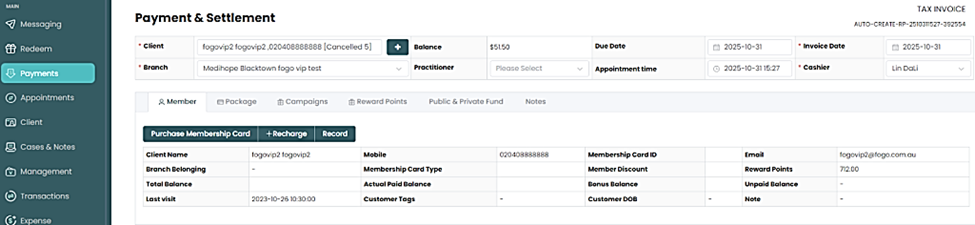
The second method involves selling through the Membership Card settings page. Simply find the membership card and follow the same steps as above.


Need a demo or want to learn more? Email us at contact@fogo365.com.

Previous: How to Set Up Membership Cards in the Fogo System
Next: How to check Membership Card Balance and Transaction Record  in the Fogo System »
← Back to List
fogo logo

Subscribe

Your email

Sendfogo logo

Subscribe to our newsletter to receive our weekly feed.

Features

All-in-one Calendar Online Booking Online Diagnosis Electronic Medical Records AI-assisted Diagnosis & Reports TCM-specific Diagnosis Pages Herbal Prescriptions & Dispensing Electronic Invoicing Online Payments Membership System Digital Vouchers Subscription Services Package Management

Professions

Traditional Chinese Medicine Acupuncture Tui Na Beauty Physiotherapy Sports Therapy Naturopathy Psychologist Disability Support Personal Trainer Tutor

Quick links

About Us Help Centre Why Fogo Pricing

Reach Us

fogo logo

Phone

+61 2 8809 9691

fogo logo

Email

contact@fogo365.com

Home It's free Business Help Centre Why Fogo Pricing Disclaimer About Us

Reach Us

fogo logo

Phone

+61 2 8809 9691

fogo logo

Email

contact@fogo365.com

© 2025 All Rights Reserved by Fogo
Terms & Conditions | Privacy Polic