


Fogo securely stores all case records, including client notes, diagnoses, and treatment details. You can conveniently access these past records to review the client’s medical history, monitor progress, and make informed clinical decisions.
Step 1: Go to the “Cases & Notes” section from the left-hand menu.
Step 2: Use the search bar or client list to find the specific client or refer to the list.
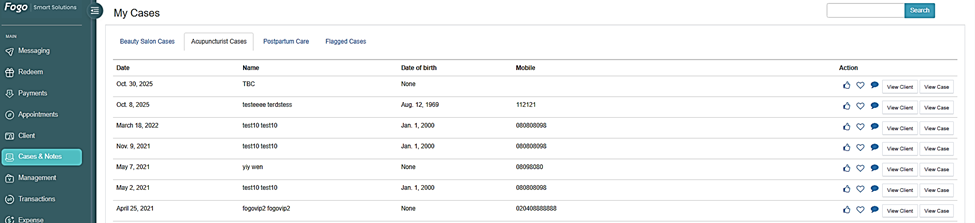
Step 3: Click on “View Case” under Actions section to open their case file.
Step 4: In the client’s case list, select the relevant case record you want to review (If there are multiple).
Step 5: Once opened, you’ll see the client’s diagnosis, practitioner notes, prescriptions, and treatment history displayed clearly within the case details page.
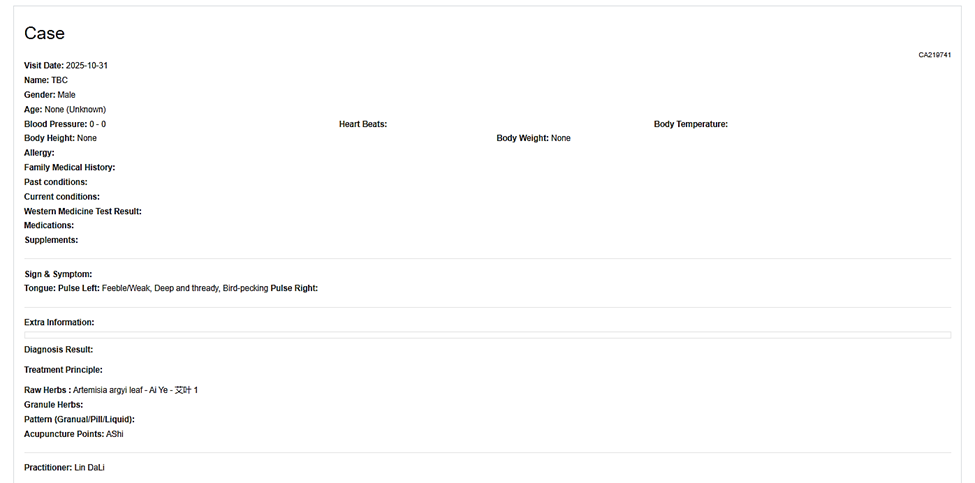

Step 6. At the bottom part of the page, multiple options such as Edit, Payment, Invoice etc can be found that you can utilize if there are any changes or updates that need to be done.
Need a demo or want to learn more? Email us at contact@fogo365.com.