


FOGO allows you to record and monitor daily cash performance easily. Follow the steps below to add a new Cash Daily Report.
Follow the steps below to correctly fill in a Cash Daily Report in the FOGO System.
Step 1. From the left pane, click Transactions > Cash Daily Report

Step 2.Click “Add New” This will open the Cash Daily Report form. Ensure all values match the physical cash count and system records.
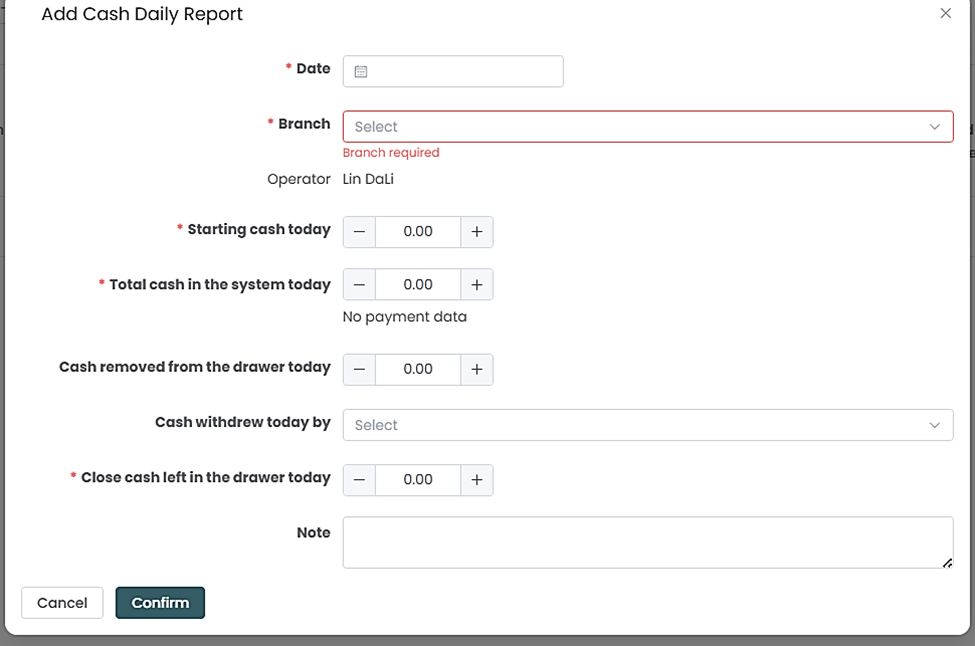
Step 3. Click “Confirm”. The report will now appear under the Cash Daily Report List.
You can also watch the demo here Demo on How to Add a Cash Daily Report in FOGO
Need a demo or want to learn more? Email us at contact@fogo365.com.