


Using private or public funds as payment in Fogo streamlines your billing process and helps ensure compliance with funding claims, all while providing transparency for both your clinic and your clients.
Step 1: Go to the “Payments” module from the left menu.
Step 2: Select the client and branch. Ensure that both are correctly assigned before proceeding.
Step 3: Click the “Public & Private Fund” tab.
Step 4: Enter the Medicare number and Medicare provider (if applicable).
Step 5: Choose the appropriate Health Fund from the dropdown list and input the Health Fund Number.
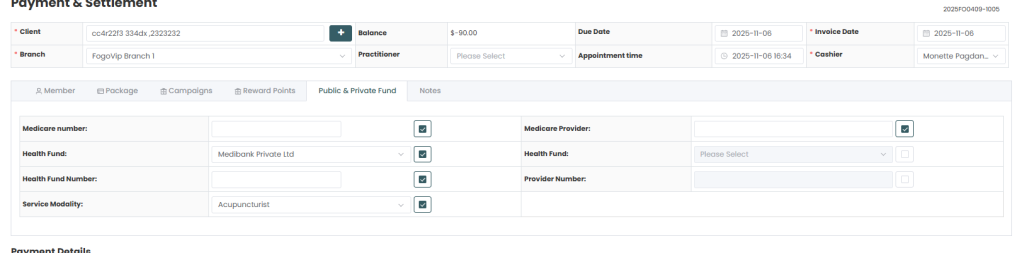
Step 6: Select the Service Modality (e.g., Acupuncturist, Physiotherapist, etc.).
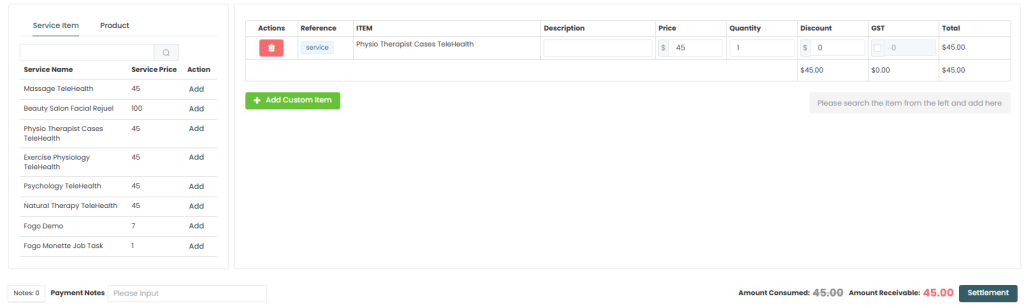
Step 7: Review all information, then proceed to add services or items under Payment Details to complete the invoice.
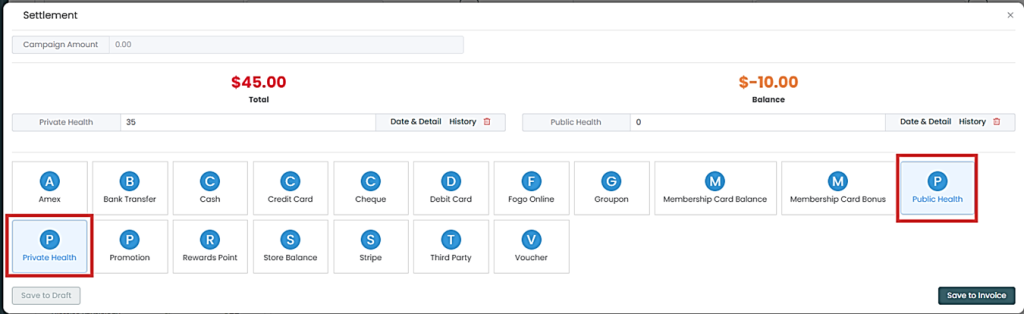
Step 8: Click Settlement once done to finalize the transaction.
Step 9. Hit “Save to Invoice” then choose either to print or email it to the customer.
You can also watch the demo here Demo on how to How to use Private and Public Fund as payment or invoice in Fogo?
Need a demo or want to learn more? Email us at contact@fogo365.com.