


Fogo gives practitioners and staff the flexibility to manage appointment cancellations or rebooking directly within the system. This ensures that schedules stay updated, clients are properly notified, and available time slots can be reassigned efficiently.
Step 1: Go to the Appointments tab from the left menu, then click Dashboard.
Step 2: To view upcoming bookings, choose the appointment date. Locate the appointment you want to cancel using the search bar or calendar view.

Step 3: Double click on the specific appointment to open its details panel.
Step 4: Select “Edit” or “Canceled” from the available options.
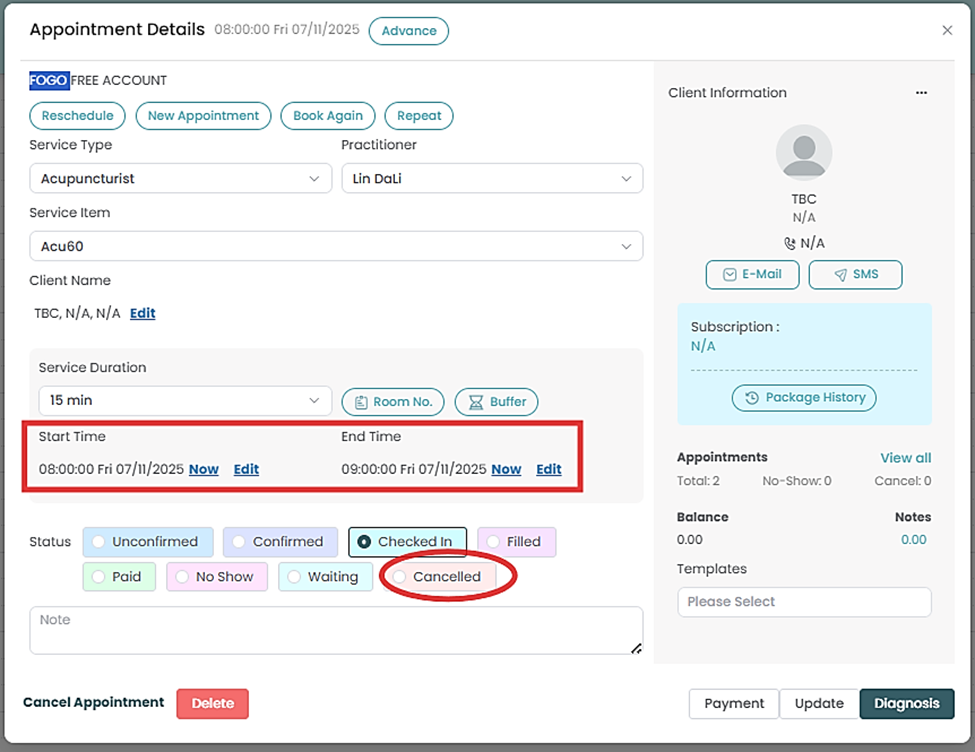
Step 5: Choose the status (e.g., canceled or No show).
Step 6:The system will automatically update the appointment status to “Cancelled” and free up the time slot for rebooking.
Need a demo or want to learn more? Email us at contact@fogo365.com.