


The Fogo System allows you to create marketing or sales campaigns such as gift cards, promos, or referral offers to help attract and reward clients.
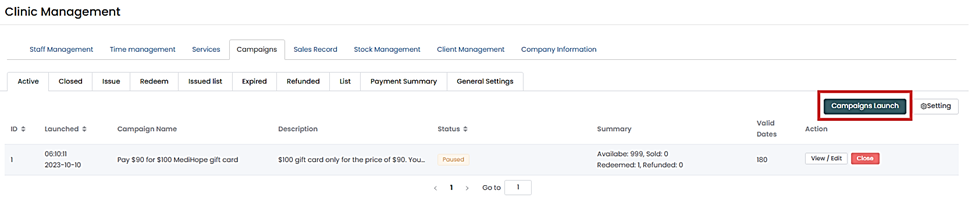
Step 1. Go to Management > Campaigns > Package.

Step 2. Click on the “Campaign Launch” button.
Step 3. Fill out the campaign details:Campaign Name – e.g., “Pay ₱90 for ₱100 MediHope Gift Card”, Price and Value, validity dates, and redemption/ issue locations.
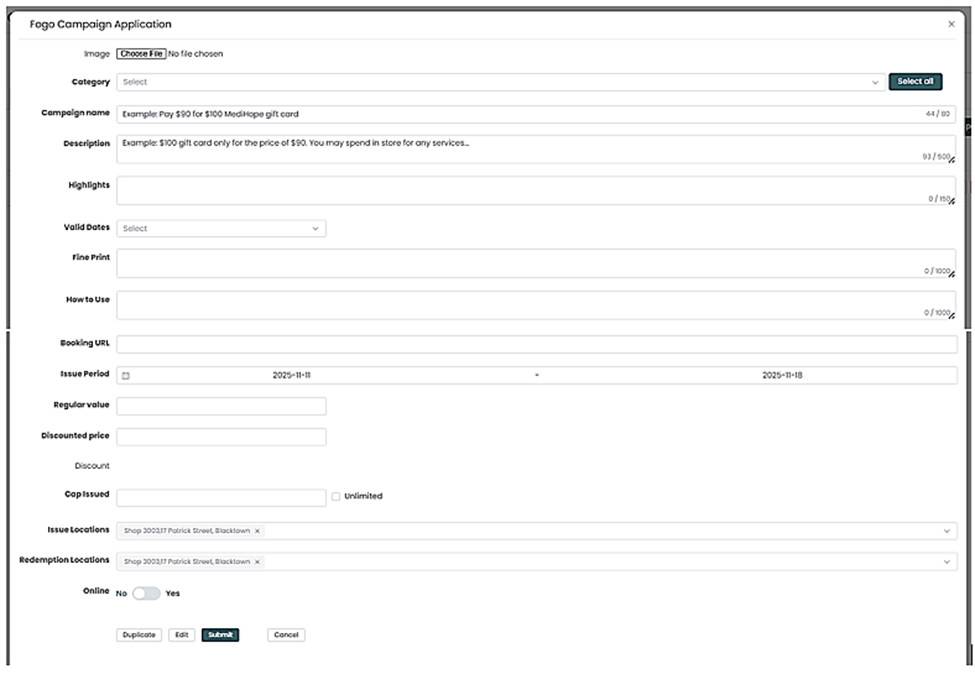
Step 4. Review the information for accuracy then click Submit to activate the campaign.
Step 5. Once saved, your campaign will appear in the Campaign List, where you can track redemptions, view status, and edit details if needed.
Monitor campaign performance regularly to measure client engagement and adjust your offers for future promotions.
Need a demo or want to learn more? Email us at contact@fogo365.com.