


The Fogo System allows you to configure a rewards points program to encourage customer loyalty. You can define how clients earn and redeem points based on their purchases or activities.
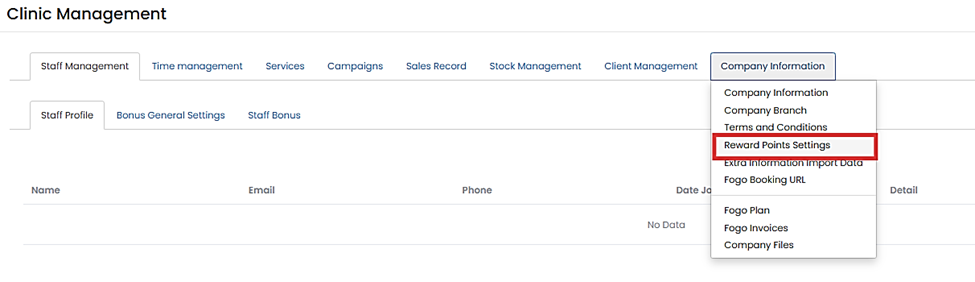
Step 1. From the left pane, go to Management > Company Information > Rewards Points Settings.
Step 2. Configure your reward rules:
- Reward Points Initial Date:
Pick the date when the reward points program will start.
⚠️ Warning: Changing the initial date will affect all clients’ existing points records. - Automatic Accumulation:
Set how clients earn points (e.g., $1 spending = 1 point). Points are automatically added during - Manual Adjustment:
Reward points can also be manually added or deducted on the Payment Page.
eligible transactions. - Reward Points Redemption Rate:
Define how many points equal $1 when redeemed (e.g., 1 Reward Point = $1).
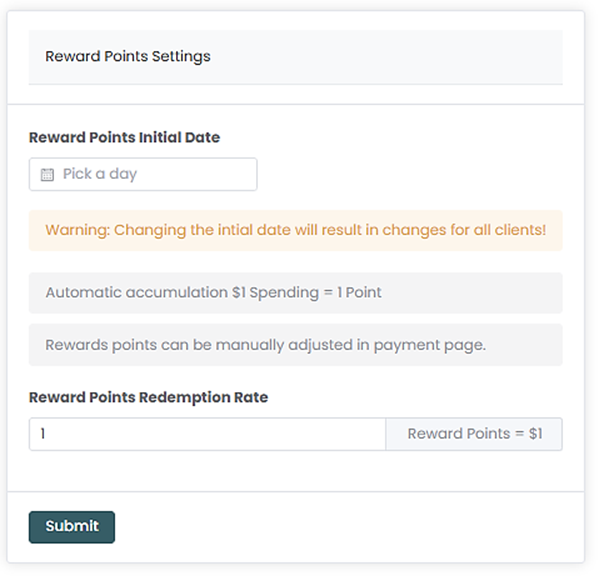
Step 3. Click Submit to apply the settings.
Adjust your reward rates carefully—changes apply system-wide and may impact existing client balances.
Need a demo or want to learn more? Email us at contact@fogo365.com.