


The Add New Expense feature in the Fogo System allows users to record and document all company-related spending accurately. By creating a new expense entry, users can specify payment details, categorize costs, and attach receipts to maintain organized financial records. This helps ensure transparency, accountability, and accurate expense tracking for reporting and audit purposes.
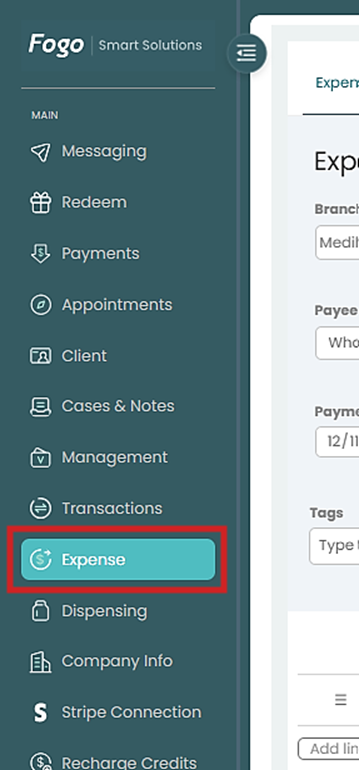
Step 1. Go to the left-hand menu and click Expense.
Step 2. Click “New Expense” on the right part of the page.

Step 3. Fill out the following fields:
- Branch – Select the branch where the expense occurred.
- Operator – Choose the staff member responsible for recording the expense.
- Payee – Select who was paid.
- Payment Account – Choose the payment source (e.g., Cash, Bank).
- Payment Date and Method – Indicate when and how it was paid.
- Reference – Add a note or transaction number if needed.
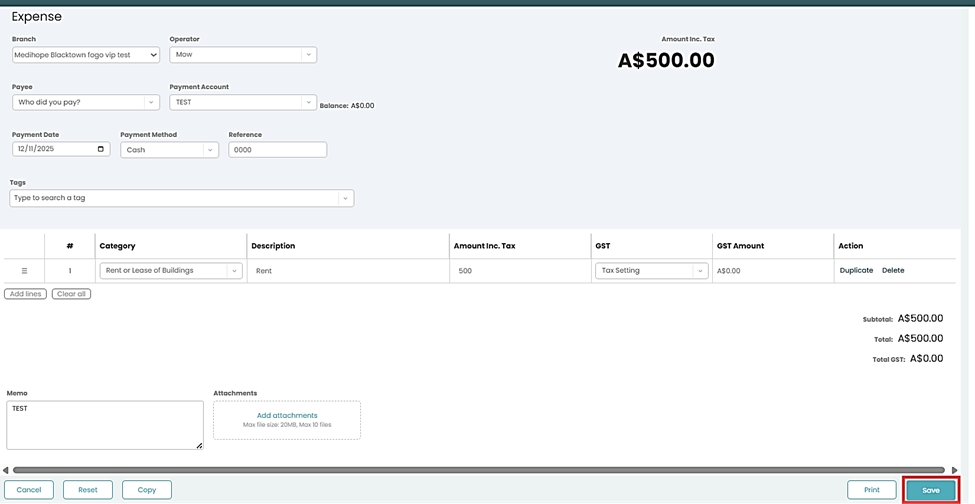
Step 4. An option to attach receipts is available and include a note.
Step 4. Click “Save” .An option to “View” or ‘Edit” an existing record is also available if needed to modify new records.
You can also watch the demo here Demo on How to Add New expense in the Fogo System
Need a demo or want to learn more? Email us at contact@fogo365.com.