


With Fogo, you can easily create various types of membership cards to engage clients, build loyalty, and add more value to your services.
Step 1.To get started, go to Management > Campaigns > Membership Cards.
Before proceeding, it’s useful to determine details such as the card name, deposit value, minimum deposit amount, recharge value, opening bonus, recharge bonus, and validity period. Membership cards can have consistent names like silver, gold, and platinum.
Step 2. Go to the membership card menu and click on Membership Card Launch.

Step 3. Select a photo to represent your membership card.
Step 4. Enter the necessary details, including the card name, description, valid dates, discount rate, deposit value, recharge value, opening bonus, and recharge bonus value.
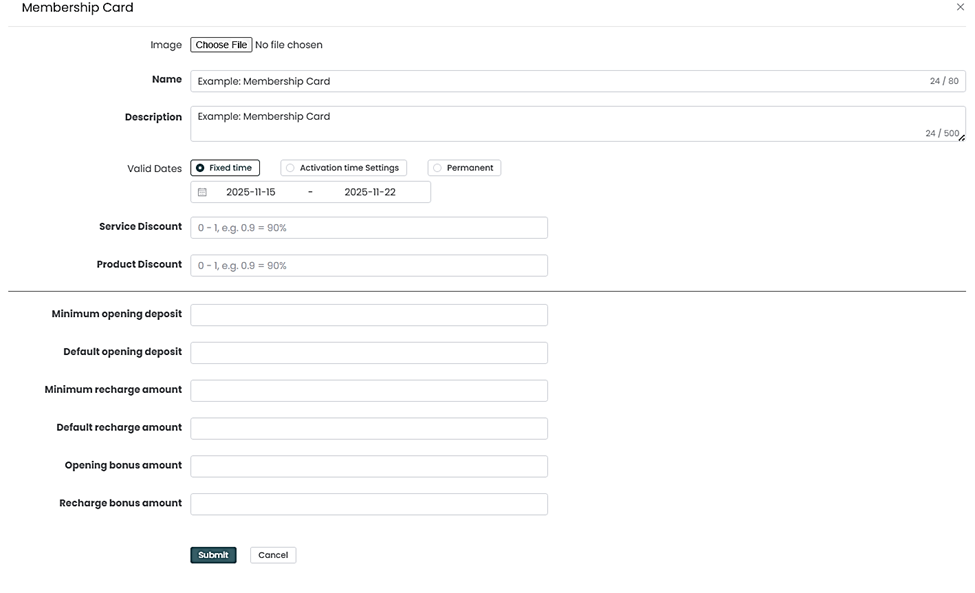
4. Click Submit.
5. If needed, make adjustments to the settings. However, note that repeatedly changing values may cause confusion. If this occurs, consider creating a new membership card instead.
.
Need a demo or want to learn more? Email us at contact@fogo365.com.