Email Email contact@fogo365.com
Phone Phone 612 8809 9691
fogo logo
  • It‘s free
  • Business
  • Help Center
  • Why Fogo
  • Pricing
  • Fogo Disclaimer
  • Posts
SIGN IN/UP
  • It‘s free
  • Business
  • Help Center
  • Why Fogo
  • Pricing
  • Fogo Disclaimer
  • Posts
  • SIGN IN/UP

How to add a practitioner/staff account into Fogo?

By fogo official • 5 Nov 2025

Adding practitioner/staff into your Fogo account must be completed before your practitioner/staff are able to use the Fogo system. 

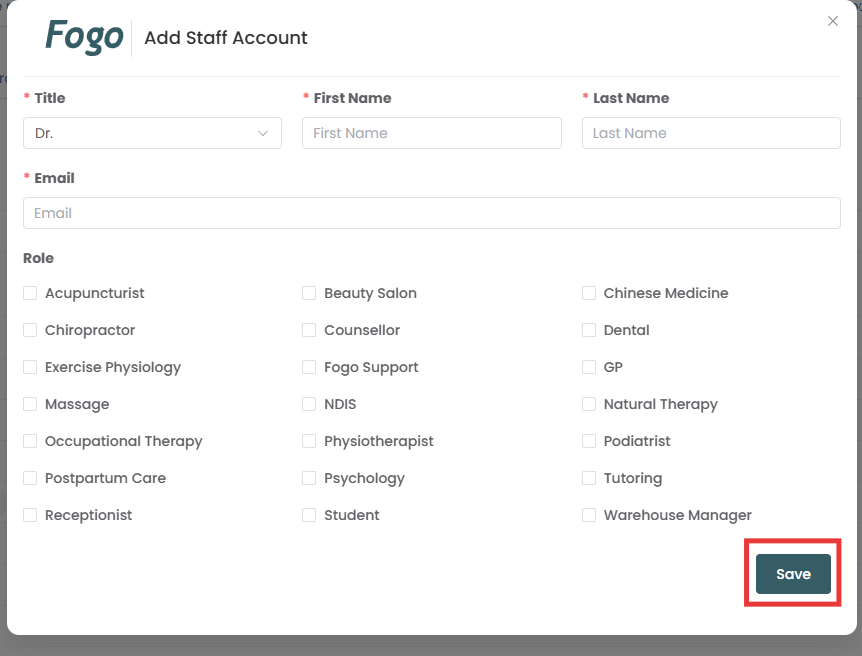
Step 1: Go to management > Staff management. Click ‘Add Staff Account’ 

Step 2: Complete the information for your staff then save.
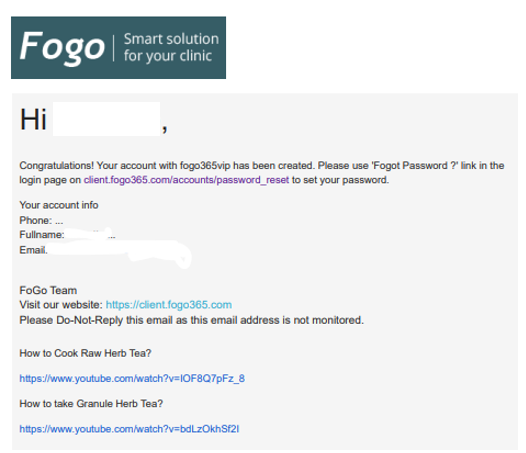
Step 3: An email will be sent to your practitioner/staff. Your practitioner/staff need to reset the password via ‘Forgot Password’ button. 

Need a demo or want to learn more? Email us at contact@fogo365.com.

Previous: How to Configure Appointment SMS Settings in the Fogo System
Next: How to add or change practitioner/staff roles in Fogo? »
← Back to List
fogo logo

Follow Us

facebook facebook twitter instagram

Subscribe

Your email

Sendfogo logo

Subscribe to our newsletter to receive our weekly feed.

Features

Appointment Client Portal Online Booking Client Management View more

Professions

Chinese Medicine Remedial Massage Beauty Salon Chiropractor View more industries

Quick links

About Us Help Centre Why Fogo Pricing

Reach Us

fogo logo

Phone

+61 2 8809 9691

fogo logo

Email

contact@fogo365.com

Home It‘s free Business Features Help Centre Why Fogo Pricing

Reach Us

fogo logo

Phone

+61 2 8809 9691

fogo logo

Email

contact@fogo365.com

Follow Us

facebook facebook twitter instagram
© 2025 All Rights Reserved by Fogo
Terms & Conditions | Privacy Polic