


The Fogo system allows you to automate appointment reminders through SMS, helping both practitioners and clients stay on schedule. You can easily configure when messages are sent and review SMS records—all from one place.
Step 1: Go to the Clinic Management > Services > Service Configuration.
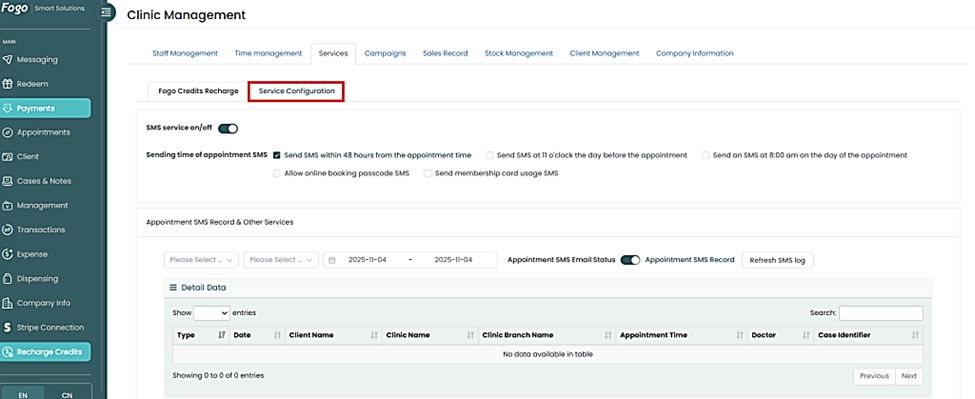
Step 2: Toggle the SMS service on/off switch to activate or deactivate the appointment SMS feature.
Step 3:Under Sending time of appointment SMS, choose when you want the system to send reminders.
You can select one or more of the following options:

Step 4: (Optional) Enable additional SMS options such as:
- Allow online booking passcode SMS
- Send membership card usage SMS
Step 5: Scroll down to the Appointment SMS Record & Other Services section to review your SMS history and settings. You can filter records by date, clinic name, or client name.
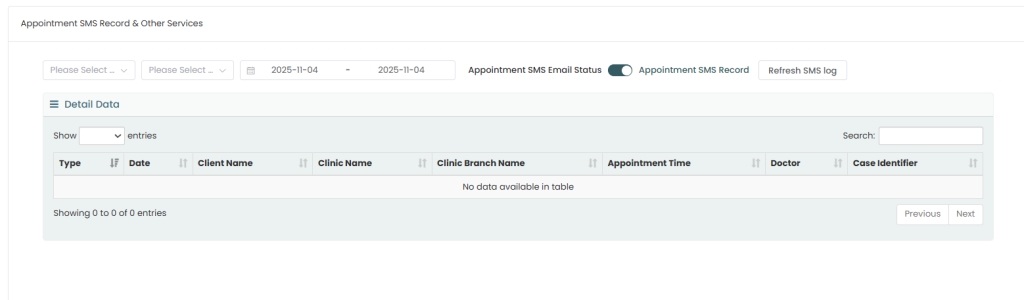
Step 6: Use the Appointment SMS Email Status toggle to enable or disable email notifications related to appointment SMS.
Step 7:Click Refresh SMS log to update and view the latest records.
Need a demo or want to learn more? Email us at contact@fogo365.com.