


Fogo lets you customize your services with complete details like category, duration, and pricing. Setting these up beforehand ensures smooth appointment booking and accurate reporting.
Step 1: Go to Management > Services > Services Set UP.
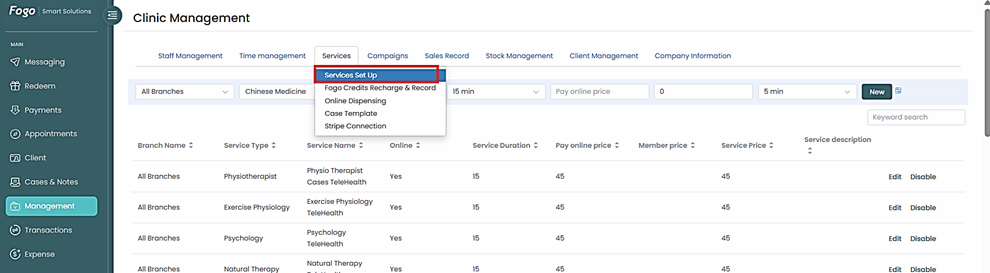
Step 2: Complete required fields then click “New”.

Step 3: An option to “Edit” and “Disable” service is also available. If you need to Edit, feel free to customize or update required information.

Step 4: Make sure to select the name of the staff who will handle the appointment for the selected services. If the staff name is not selected, the staff will not be shown on the online booking portal
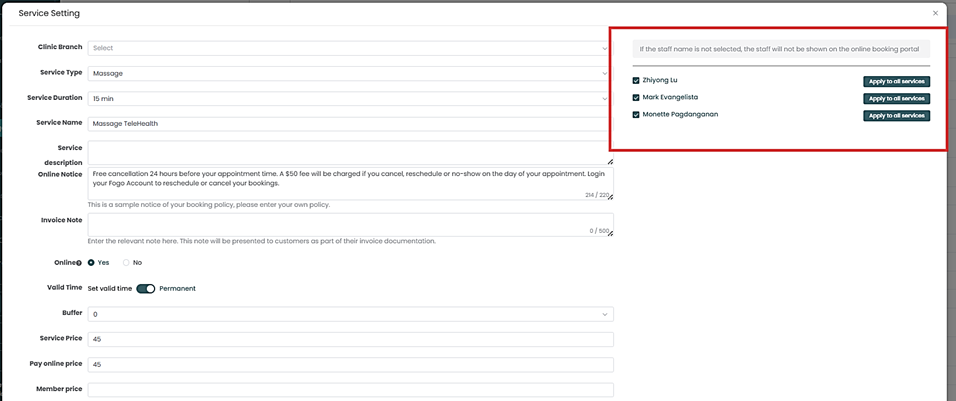
Step 5: Once service has been set up, click ‘Save”.
Need a demo or want to learn more? Email us at contact@fogo365.com.