


Fogo gives you the flexibility to split a single invoice across multiple payment modes. This feature is especially useful when clients want to combine cash, card, rewards, or health fund payments in one transaction—ensuring smooth and accurate billing for every situation.
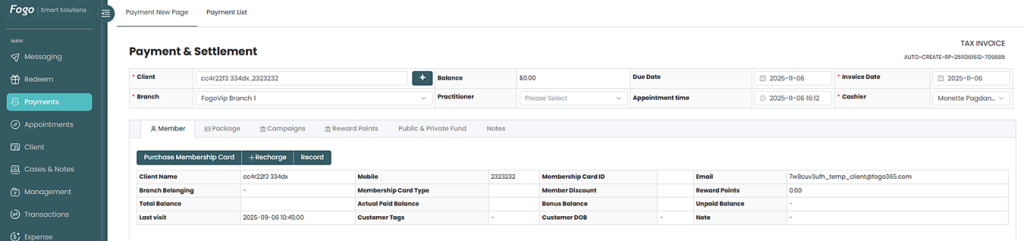
Step 1: Go to the Payments section and select the client, branch, and practitioner.
Step 2: Add the services or products under Payment Details.
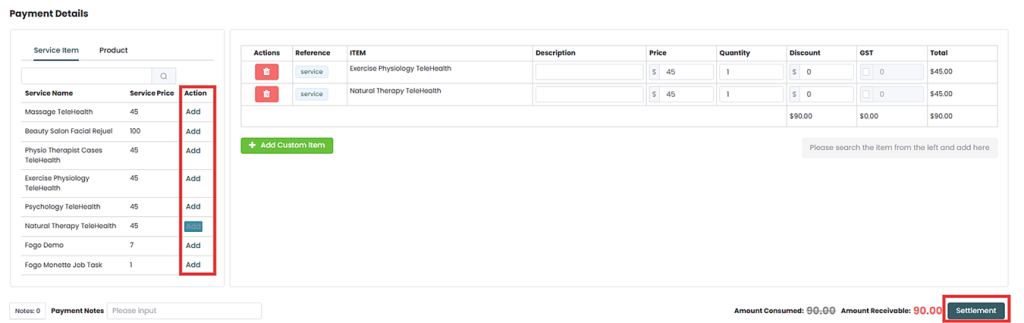
Step 3. Once completed, click “Settlement” to generate the invoice.
Step 4. To split payments, select the first payment mode (e.g., cash or card) and enter the amount. Continue adding payment types until the total amount is fully distributed.
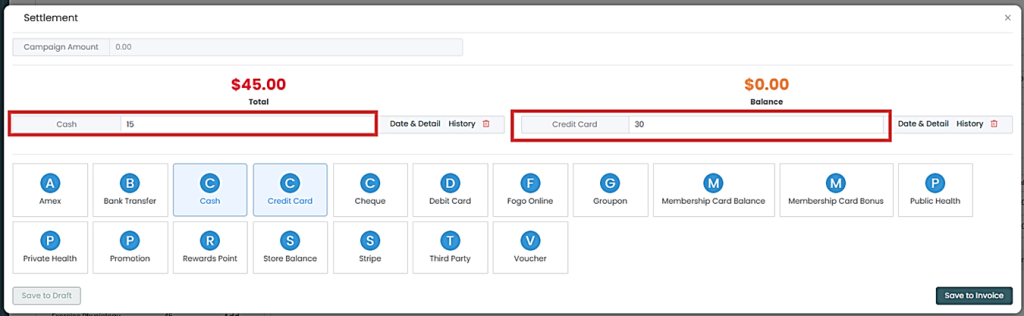
Step 6: Continue adding payment types until the total amount is fully distributed.
Step 7: Review the breakdown and then “Save to Invoice”.
You can also watch the demo here Demo on How to select multiple payment modes for invoicing?
Need a demo or want to learn more? Email us at contact@fogo365.com.