


With Fogo’s reward payment feature, you can encourage client loyalty while maintaining accurate transaction records. Clients can conveniently use their earned points as payment during checkout.
Step 1. In the Payment section, go to “Rewards Points” tab.
Step 2. Client’s existing points will show on this page.
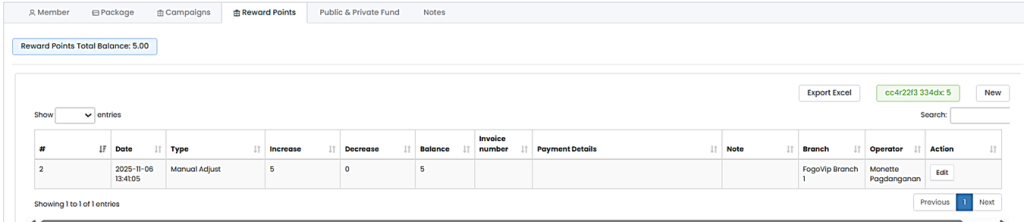
Step 3. If there are no points yet, Click “New” to top up clients’ rewards points (if necessary).
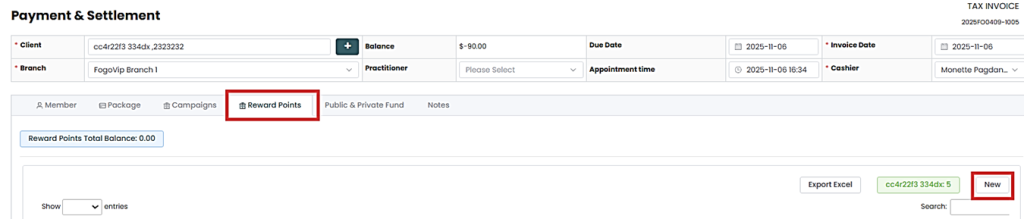
Step 4. Submit by clicking “Settlement”.
Step 5. Once on the Settlement page, select “Rewards Points”, then enter the client’s available points. This will be deducted to the balance due. Then select the 2nd mode of payment to pay off the remaining balance.
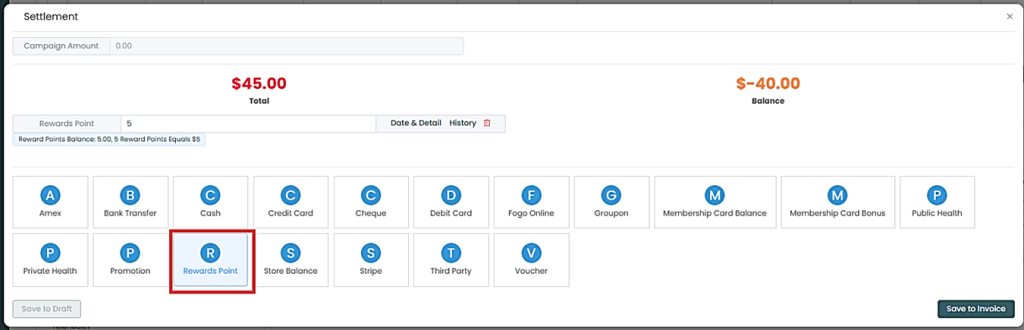
Step 6. Hit “Save to Invoice” then choose either to print or email it to the customer.
You can also watch the demo here Demo on How to use Rewards as mode of payment?
Need a demo or want to learn more? Email us at contact@fogo365.com.