


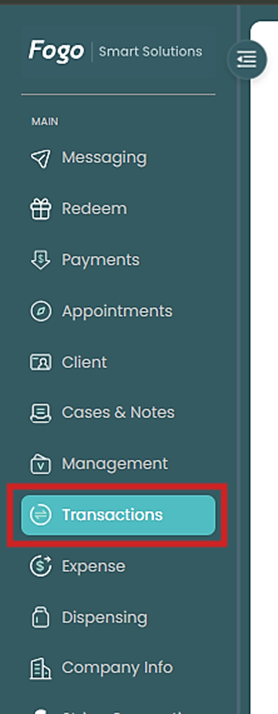
Step 1. From the left pane, go to Transactions > Campaigns.
Step 2. On the Digital Vouchers tab, select the transaction you need to track, monitor or update.
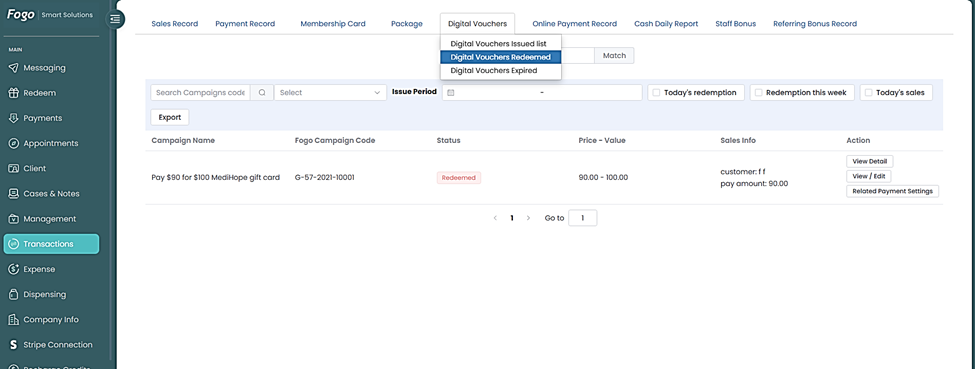
Step 3. Set your date range (e.g., 2025-01-01 to 2025-11-30) to filter results. You can view both Summary Data and Detail Data.

Step 4. Use the Search or Filter function to locate specific records by campaign code, and redemption date box.

Step 5. Under Actions you can either View, Edit or see related Payment settings.
Step 6. An option to export is also available for reporting and analytics purposes.
You can also watch the demo here Demo on How to View and Track status of Digital Vouchers issued in the Fogo System
Need a demo or want to learn more? Email us at contact@fogo365.com.