


The Fogo System provides a comprehensive Sales Record page where you can review all client transactions, payment details, and sales performance within a selected date range.
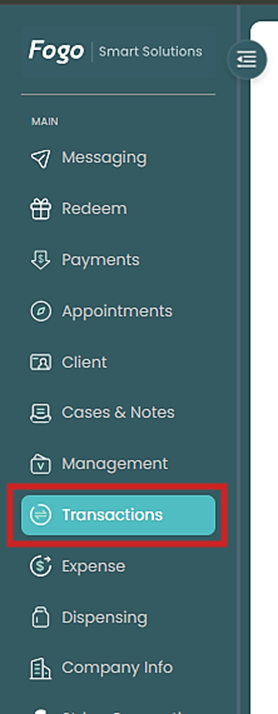
Step 1. From the left pane, go to Transactions > Sales Record.
Step 2. Set your date range (e.g., 2025-01-01 to 2025-11-30) to filter results. You can view both Summary Data and Detail Data.
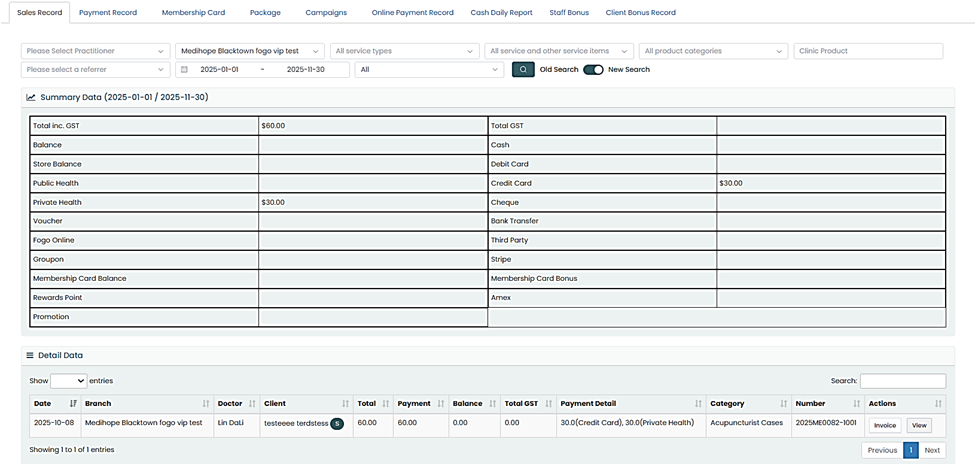
Step 3. Use the Search or Filter function to locate specific records by client, branch, or category.

Step 4. Click View under Actions to see full transaction details or Invoice and print the record.
Step 5. Switch between Old Search and New Search options for different viewing layouts.
Step 6. Do the same in checking Payments by tapping on the Payment tab.
Regularly review your sales records to ensure accurate reporting and to reconcile all payments across different modes and branches.
You can also watch the demo here Demo on How to View and Track Sales Transactions and Payments in the Fogo System
Need a demo or want to learn more? Email us at contact@fogo365.com.