


The Fogo System allows you to keep track of all dispensing activities—such as clinic prescriptions, online orders, and retail sales—so you can monitor product movement, pricing, and dispenser performance efficiently.
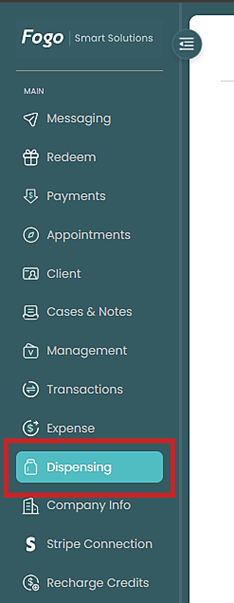
Step 1. From the left pane, go to Dispensing.
Step 2. Select the tab you want to monitor and manage.

Step 3. Use the filters (e.g., date range, branch, or order type) to narrow down the records you want to view.

Step 4. On the right part of the page under Actions – change/update the status.
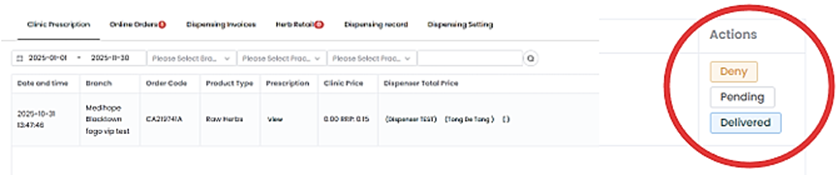
For reporting purposes, you can adjust the Dispensing Date Range (e.g., 2025-01-01 to 2025-11-30) to review transactions within a specific period.
Access Dispensing Settings anytime to configure pricing or operational rules for dispensing. Regularly monitor your dispensing records to ensure accurate tracking of prescriptions and sales across all branches. This helps maintain compliance and inventory accuracy.
Need a demo or want to learn more? Email us at contact@fogo365.com.