Email Email contact@fogo365.com
Phone Phone 612 8809 9691
fogo logo
  • It‘s free
  • Business
  • Help Center
  • Why Fogo
  • Pricing
  • Fogo Disclaimer
  • Posts
SIGN IN/UP
  • It‘s free
  • Business
  • Help Center
  • Why Fogo
  • Pricing
  • Fogo Disclaimer
  • Posts
  • SIGN IN/UP

How to enter client information?

By fogo official • 4 Nov 2025

The Fogo system allows you to easily enter and manage client information, ensuring that all your records are accurate and up to date.

Step 1: Go to menu on the top and click ‘Client’
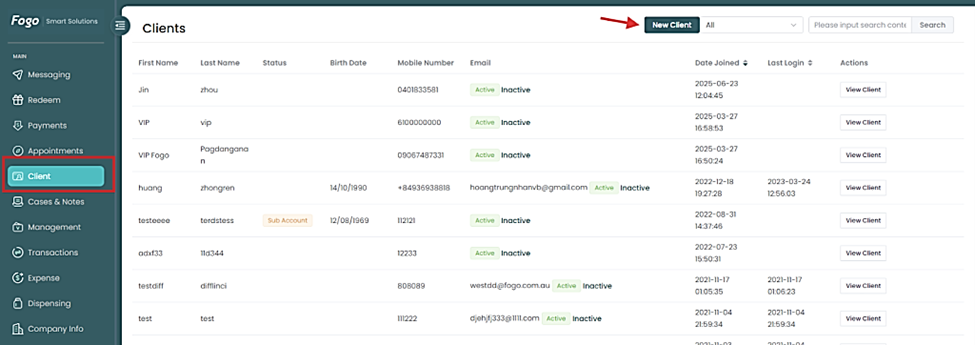
Step 2: Search or add a new client.
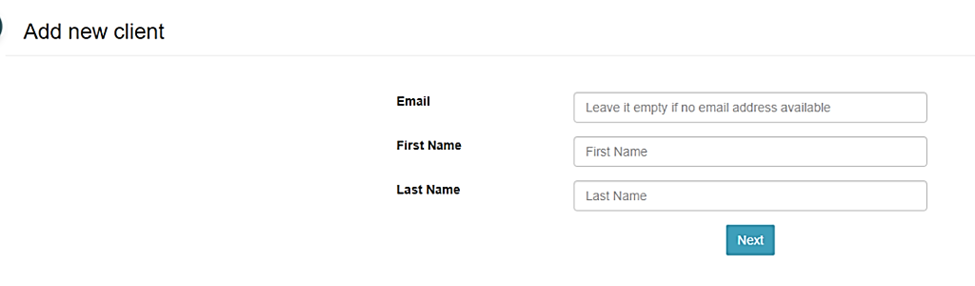
Step 3: Enter/Edit client details then save.


Need a demo or want to learn more? Email us at contact@fogo365.com.

Previous: How to Set Up Google Authenticator for Enhanced Fogo Login Security
Next: How to set automated TEXT reminders for clients’ appointments? »
← Back to List
fogo logo

Follow Us

facebook facebook twitter instagram

Subscribe

Your email

Sendfogo logo

Subscribe to our newsletter to receive our weekly feed.

Features

Appointment Client Portal Online Booking Client Management View more

Professions

Chinese Medicine Remedial Massage Beauty Salon Chiropractor View more industries

Quick links

About Us Help Centre Why Fogo Pricing

Reach Us

fogo logo

Phone

+61 2 8809 9691

fogo logo

Email

contact@fogo365.com

Home It‘s free Business Features Help Centre Why Fogo Pricing

Reach Us

fogo logo

Phone

+61 2 8809 9691

fogo logo

Email

contact@fogo365.com

Follow Us

facebook facebook twitter instagram
© 2025 All Rights Reserved by Fogo
Terms & Conditions | Privacy Polic